
- Training
- Service
- Promotion
- Schedule
- Testing Center
- News
- Contact
8/10/2021


Here we will see two examples on Power BI sum group by multiple columns and Power BI sum group by two columns.
Here is the sample data we are going to use to solve this problem.
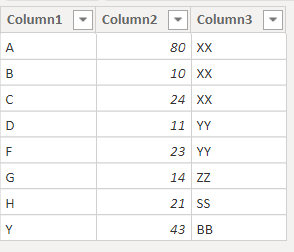
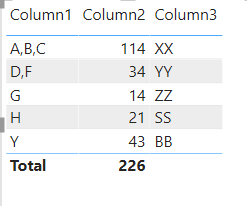
Here we will combine column1 by commas and sum the column2 based on column 3. So, it will show A,B,C(column1) 114(column2) XX(column3)
For this, we will create a calculated table by using Power BI Dax.
|
Combined = SUMMARIZE ( 'Table', 'Table'[Column3], "Column1", CONCATENATEX ( 'Table', 'Table'[Column1], "," ), "Column2", SUM ( 'Table'[Column2] ) ) |
.png)
In the below screenshot, you can see the power BI sum group by multiple columns.
Here we will see the Power BI sum group by two columns using power query in power BI desktop.
We will use the below sample data to find the sum group by two columns in power BI desktop.
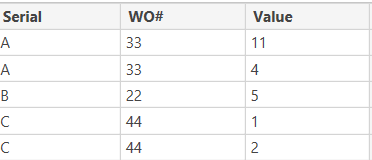
We will sum up the values based on WO# and group them by serial using power query.
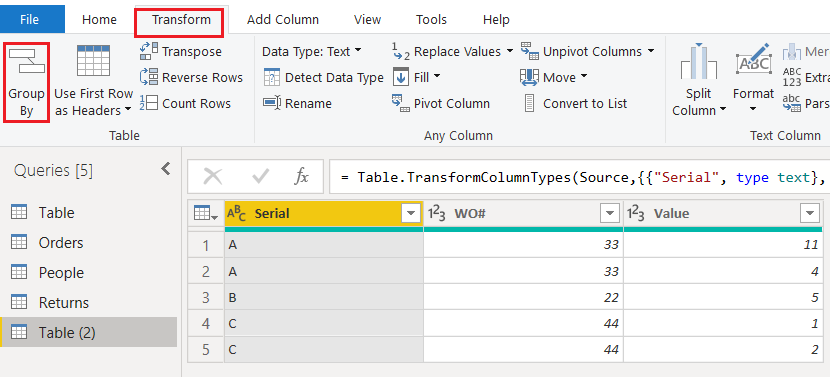
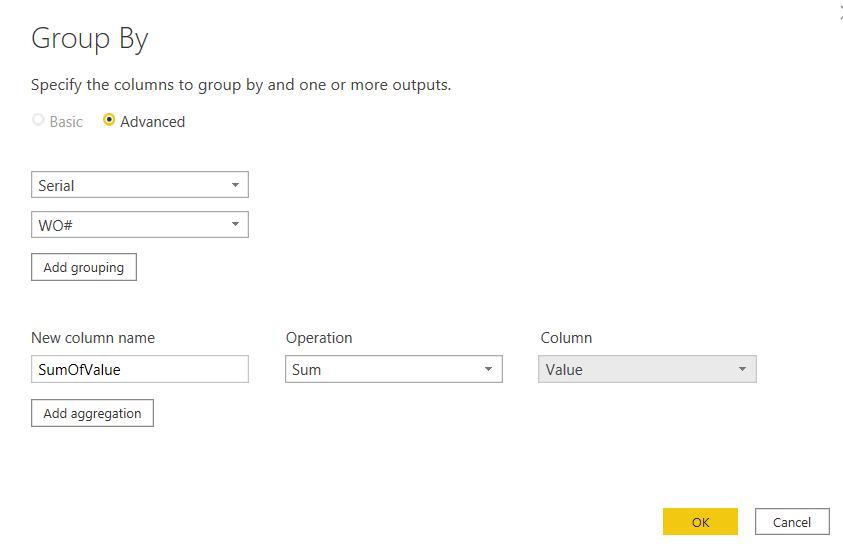
In the below screenshot you can see the power BI sum group by two columns using power query

In this power BI tutorial, we learned power BI sum group by multiple columns. And also we discussed the below points power BI sum group by two columns using power query.
Source: www.enjoysharepoint.com

12/11/2025


