- Training
- Service
- Promotion
- Schedule
- Testing Center
- News
- Contact


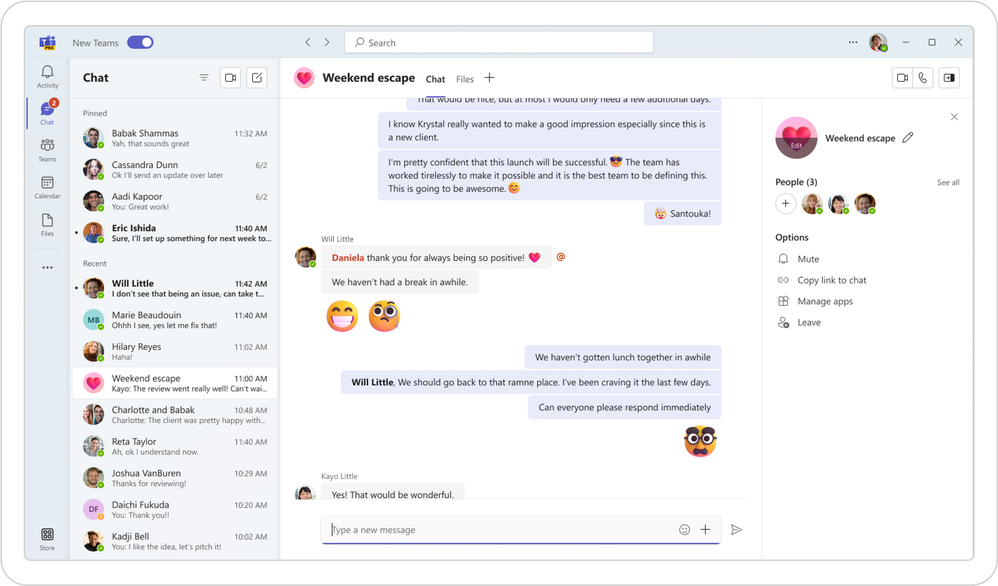
As we announced in this blog post, today we’re starting to roll out the preview version of the new Teams desktop app for Windows.
Microsoft has been listening to your feedback which has culminated in a reimagining of Teams from the ground up to provide a faster, simpler, and more flexible experience. New Teams is built on a foundation of speed, performance, and flexibility, to help you save time, and work together more efficiently.
With the new Teams app that launches up to 2X faster and enables you to join meetings up to 2X faster, you can focus on what matters most to you. The new Teams has been optimized for more efficient use of system resources, using up to 50% less memory. It adds support for users that collaborate across organizations and manage multiple work or school accounts. You can be signed into multiple organizations and accounts simultaneously and receive notifications for all your accounts, no matter which one is currently in use. The new Teams also ensures simplified IT management and enhanced data security.
Faster and more resource efficient
Microsoft made a significant investment to overhaul the Teams platform to meet our goal for new Teams to be twice as fast while using half the system resources.
To optimize navigation, Microsoft prioritized the user interactions that occur most frequently, including switching between different chats, channels, and activities. On average, a typical user switches ten thousand times per month, emphasizing the importance of a faster and more responsive experience. With new Teams, switching between chats, channels, and activities will be instant, without having to wait for content to load. A fast-scrolling experience is crucial for you to access relevant information quickly and efficiently. With the new Teams, Microsoft have lowered shimmering and reduced wait times. The change enables faster app responses to your actions. The new Teams app has been optimized for resource utilization to free up memory and disk space for other applications and provide compatibility with a broader range of computers.
These are some of their findings on new Teams' speed and performance improvements.
Collaborate more effectively across organizational boundaries
Microsoft understand how challenging it is for you to collaborate across organizations and manage multiple work or school accounts. You cannot receive real-time notifications during calls or meetings across organizations or accounts. Switching from one organization to another or from one account to another interrupts your workflow since it requires you to log in and out constantly.
New Teams will enable you to collaborate more effectively across organizational boundaries by being actively signed into multiple accounts at the same time and receiving real-time notifications no matter which one is currently in use. You can seamlessly engage with users across multiple accounts and organizations without having to drop out of a call or meeting, ensuring no disruption to your workflow.
Simplify IT management
Microsoft want to deliver a cohesive management experience that streamlines the distribution of Teams desktop app on Windows devices and removes the complexity associated with user installation. Admins can now leverage application management tools like Microsoft Intune to simplify app deployment and updates. Since Intune supports deploying MSIX applications to client devices through the client app model, installing and uninstalling an MSIX-packaged app can be performed silently. IT Pros can define when a user gets updates to an MSIX and whether the update experience will be silent. Intune and MSIX packaging makes installing the new Teams app more reliable while reducing network usage and disk space, resulting in less idle memory usage.
Secure your business data
To reduce your risk from cyberattacks, Microsoft focused on developing solutions that help you prevent, detect, and respond to an attack. We have implemented advanced security measures to enhance the protection of our system, including the adoption of Trusted Types and implementation of a more stringent Content Security Policy. This results in increased protection against cross-site scripting (XSS) attacks for users of the new Teams app. Additionally, the MSIX packaging format ensures Teams is protected by Windows security features, and you have the latest app version with security updates and bug fixes.
Things to keep in mind
As you try out the new Teams, you will likely encounter some gaps as this preview release only includes some of the features available in classic Teams. Features such as 3rd party apps, Line of Business (LOB) apps, advanced calling features such as call queues, and advanced meeting capabilities, including breakout rooms, have yet to be released.
Availability
The preview of the new Teams app is currently only available to our commercial users on Windows. Microsoft is working on extending the preview of the new Teams to a broader set of customers, including Education, Government Clouds, and platforms such as Mac, VDI, and Web later this calendar year.
There is no direct impact to the Teams mobile app experience on iOS and Android since the new Teams is largely an architectural update focused on desktop, web, and VDI.
Source: techcommunity.microsoft.com