- Training
- Service
- Promotion
- Schedule
- Testing Center
- News
- Contact


You can explore all Power Apps capabilities for free by signing up for a Power Apps trial plan that expires after 30 days. If you don't have any license for Power Apps, the trial plan provides temporary access to these and other features:
If you have a Power Apps license or a license through Office 365, you already have access to some of these features; the trial license temporarily expands your access to include all features in the previous list.
|
Note
|
To find out which license or licenses you already have, try to sign in to Power Apps with your work or school credentials.
|
You can't sign in by using a personal email address, such as one that ends in outlook.com, hotmail.com, or gmail.com. For more information, see What email address can I use? later in this topic. |
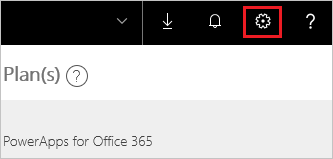
To start a free, 30-day trial of Power Apps per user plan from an existing license, sign in to Power Apps, and then try any feature that requires a premium Power Apps license. (For example, select the gear icon near the upper-right corner, select Admin center, and then select New environment near the upper-right corner.) Then follow the prompts to complete the sign-up process.
Get a license from scratch
Regardless of whether you have a license for Power Apps, you can start a free, 30-day trial of Power Apps per user plan by following these steps:
If you're using a phone, open the menu in the upper-right corner first, and then select Sign up free.
|
For more information, see What email address can I use? later in this topic. |
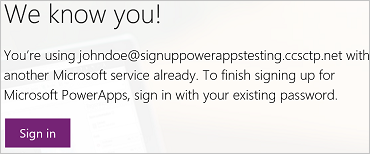
Otherwise, follow the prompts to check your email, verify your email address, provide more information if necessary, and select Start.
FAQ
What email address can I use?
You can use a work or school address to sign up for a trial license. If you use another kind of address, you might experience one of the symptoms in this table.
| Symptom / error message | Cause and workaround | |
|
Personal email addresses (e.g. nancy@gmail.com) You receive a message like the following during signup:
or
|
Power Apps doesn't support email addresses provided by consumer email services or telecommunications providers. To complete signup, try again using an email address assigned by your work or school. |
|
|
.gov or .mil addresses You receive a message like the following during signup:
or
|
Power Apps doesn't support .gov or .mil addresses at this time. | |
|
Email address is not an Office 365 ID You receive a message like the following during signup:
|
Your organization signs in to Office 365 and other Microsoft services with IDs other than email addresses. For example, your email address might be Nancy.Smith@contoso.com, but your ID is nancys@contoso.com. To complete signup, use the ID that your organization has assigned to you for signing in to Office 365 or other Microsoft services. If you don't know what this is, contact your IT administrator. |
Power Apps trial licenses are only available in the Azure commercial cloud. Power Apps trial licenses are not available in Azure Government and Microsoft Azure in China clouds.
You'll be prompted to request an extension of the trial or purchase a plan 30 days after the trial starts.
If you don't extend the trial or purchase a plan but you still have another kind of license, you can still use all the features of Power Apps that your other license provides. Any data in Common Data Service will remain as it is, and any app or flow that uses Common Data Service will continue to run as it did if your license supports them. If you try to use premium Power Apps features but your existing license doesn't (for example, modify a schema or entities in Common Data Service), you'll be prompted to purchase a plan.
Source: Microsoft