- Training
- Service
- Promotion
- Schedule
- Testing Center
- News
- Contact


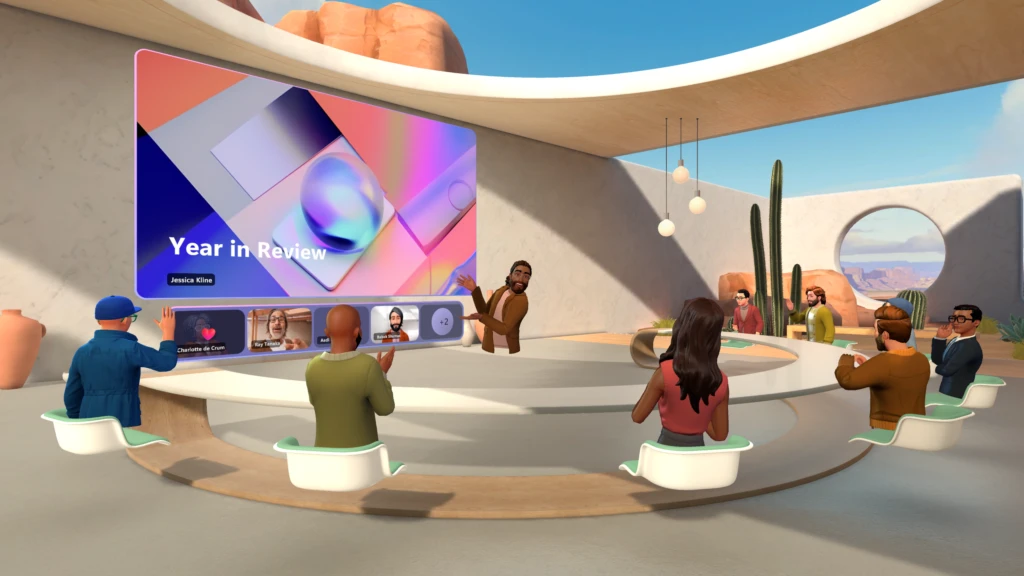
Microsoft is launching its immersive 3D meetings inside Microsoft Teams today. Microsoft Mesh, the company’s mixed reality platform, is coming out of preview and being integrated into Teams to let people gather in virtual spaces with or without a VR headset.
 |
Microsoft Mesh |
Meeting you where you work: Mesh in Teams
Starting today, enjoy the benefits of deeper connection from right within Microsoft Teams, the smart place to work for hundreds of millions of people. Mesh in Teams elevates engagement in Teams meetings with ready-made 3D immersive spaces crafted to suit your needs, whether it’s a team social gathering, brainstorming session, or a round-table discussion. Design an avatar to represent yourself and include everyone in the conversation. Host multiple, simultaneous small-group discussions with spatial audio, which enables productive side conversations during brainstorming, like in the physical world. This lessens the cognitive load and boosts the effectiveness of discussions.
Use the same Teams features you love from within a 3D space, like accessing shared content for collaboration, communicating with Teams chat, and using live reactions to express yourself.
Getting started is easy. When you’re in a meeting in new Teams from your PC, simply select the “immersive space (3D)” option from the View menu.
Reimagine connection with custom experiences in Microsoft Mesh
Organizations can also host larger events with custom, immersive experiences tailored to their needs with Microsoft Mesh. With the no-code editor, start with a set of ready-made immersive spaces and customize the space by adding visual elements like banners featuring your organization’s logo, videos showcasing your product, presentation content, and more. Effortlessly orchestrate these visual elements so they fit right into the flow of your event with our easy-to-use event organizer tools. Take it a step further and harness the power of Unity with the Mesh toolkit to create your own custom interactive experiences, including venues for all hands meetings, onboarding, simulations, or training. With the no-code editor and Mesh toolkit to craft custom experiences, the opportunities are endless.
Source: microsoft.com